> For the complete documentation index, see [llms.txt](https://docs.appmixer.com/llms.txt). Markdown versions of documentation pages are available by appending `.md` to page URLs; this page is available as [Markdown](https://docs.appmixer.com/appmixer-self-managed/authentication-hub.md).
# Authentication Hub
Appmixer features an internal Authentication Hub, functioning as an authentication proxy, which simplifies the setup process by eliminating the need to register your own OAuth credentials with third-party services. This means all OAuth-based connectors offered by Appmixer are ready to use right out of the box. However, should you prefer to use your own OAuth credentials for enhanced customization or compliance reasons, you have the flexibility to do so. This can be done for all or selected connectors by specifying your OAuth credentials (`clientId` and `clientSecret`) as outlined in the [Connector Configuration](/getting-started/services.md) section of this documentation.
The Authentication Hub is enabled for all hosted Appmixer tenants. In self-managed installations, the Authentication Hub has to be explicitly set.
## Basic Setup
To start using the Authentication Hub, the system plugin `auth-hub` has to be turned on. This is automatically turned on for Hosted Appmixer tenants and can be turned on by adding the `auth-hub` plugin ID to the `SYSTEM_PLUGINS` ENV variable.
```sh
# Turning on the plugin
SYSTEM_PLUGINS=auth-hub
# Required variables
AUTH_HUB_URL= # URL of the Authentication Hub
AUTH_HUB_TOKEN={token} # Provided by Appmixer
# Optional variables
AUTH_HUB_AUTOMATIC=true|false # true by default
```
To request the `AUTH_HUB_TOKEN`, contact our customers support by sending email to [support@appmixer.com](https://mail:support@appmixer.com).
## Additional Configuration
You can redirect all OAuth requests to the Authentication Hub, or you can use it just for a selected set of connectors.
If the `AUTH_HUB_AUTOMATIC` is set to `true` then all OAuth requests for all installed connectors that do not have clientId/clientSecret (OAuth 2), or consumerKey/consumerSecret (OAuth 1) configured through the Backoffice (Connector Configuration), will be redirected to the Authentication Hub. This is useful, if you want to use all the available connectors, but don't want to create all the necessary OAuth apps.
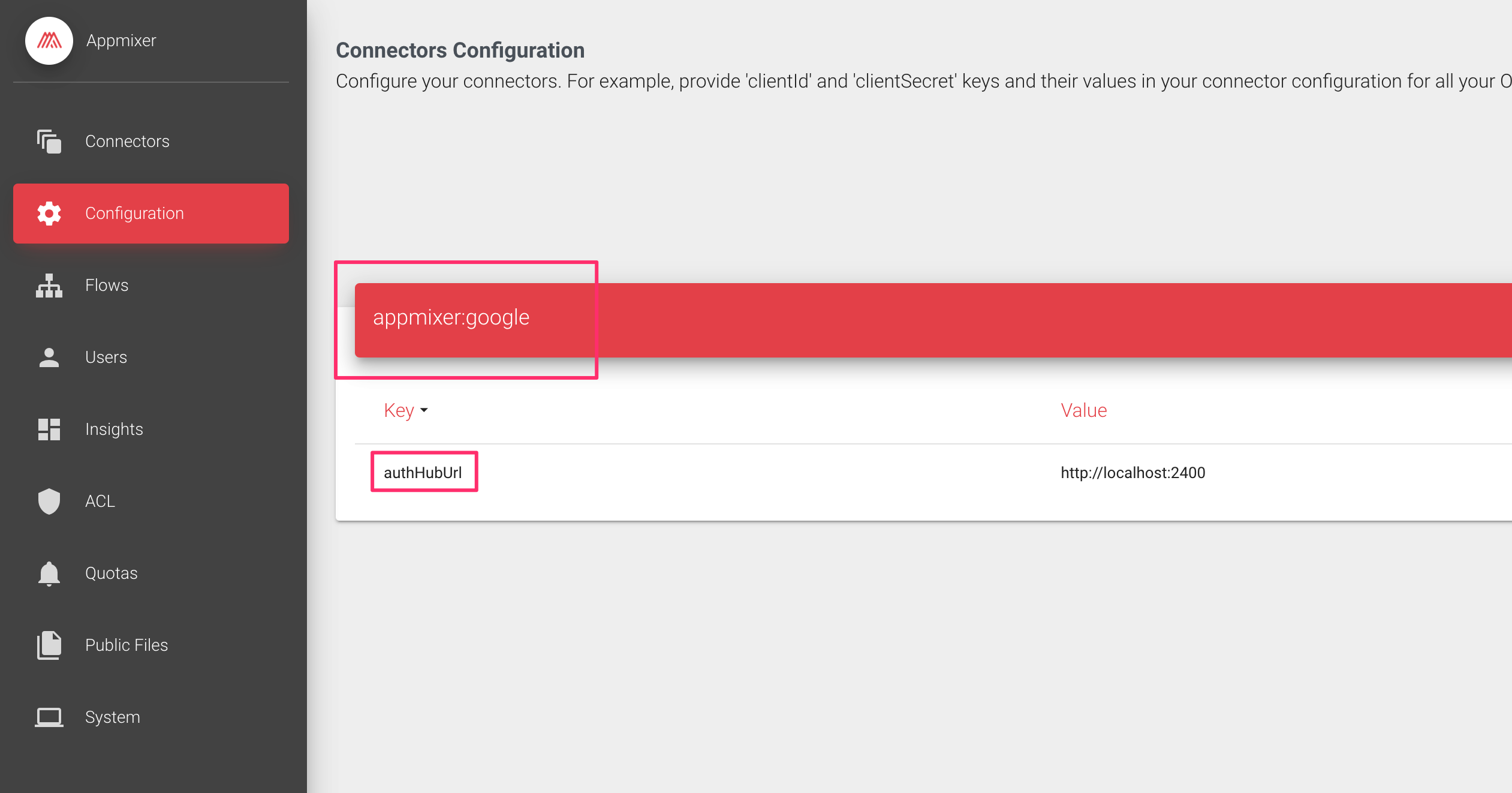
If the `AUTH_HUB_AUTOMATIC` is set to `false`, Appmixer checks the connector configuration. If the connector has clientId/clientSecret (OAuth 2), or consumerKey/consumerSecret (OAuth 1) configured through the Backoffice (Connector Configuration), Appmixer will not use the Authentication Hub (all OAuth requests will go directly from your Appmixer tenant to the relevant OAuth 3rd party). If you add `authHubUrl` to the connector configuration, all the authentication requests will be redirected to the Authentication Hub URL provided:
---
# Agent Instructions
This documentation is published with GitBook. GitBook is the documentation platform designed so that both humans and AI agents can read, navigate, and reason over technical content effectively. Learn more at gitbook.com.
## Querying This Documentation
If you need additional information that is not directly available in this page, you can query the documentation by asking a question.
Perform an HTTP GET request on the following URL with the `ask` and `goal` query parameters:
```
GET https://docs.appmixer.com/appmixer-self-managed/authentication-hub.md?ask=&goal=
```
`ask` is the immediate question: it should be specific, self-contained, and written in natural language.
`goal` is what the user is ultimately trying to achieve, the reason they need the answer. Sharing it helps GitBook give you a better, more relevant answer. A goal is most helpful when it describes the outcome the user wants rather than restating the question. For example, with `ask=how do I create an API token`, a goal like `automate deployments from our CI pipeline` lets GitBook tailor the answer to that use case.
The response will contain a direct answer to the question and relevant excerpts and sources from the documentation.
Use this mechanism when the answer is not explicitly present in the current page, you need clarification or additional context, or you want to retrieve related documentation sections.