> For the complete documentation index, see [llms.txt](https://docs.appmixer.com/llms.txt). Markdown versions of documentation pages are available by appending `.md` to page URLs; this page is available as [Markdown](https://docs.appmixer.com/building-connectors/manifest/outports.md).
# outPorts
The definition of the output ports of the component. It's an array of objects.
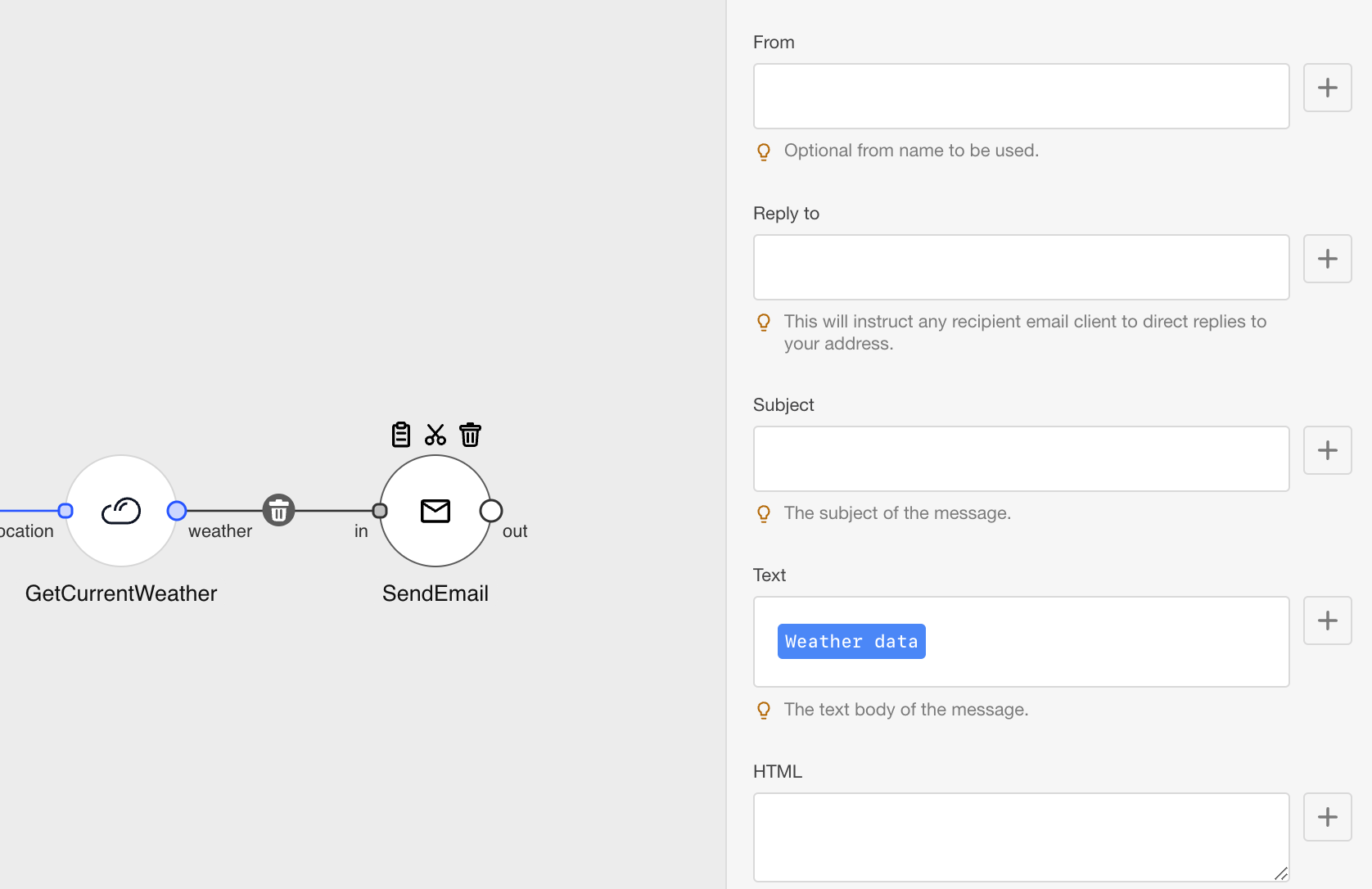
Components can have zero or more output ports. Each output port has a `name` and optionally an array `options` that defines the structure of the message that this output port emits. Without the options object, the user won't be able to see the possible variables they can use in the other connected components. For example, a component connected to the `weather` output port of our *GetCurrentWeather* component can see the following variables in the variables picker:

An example of an `outPorts` definition can look like this:
```json
{
"outPorts": [
{
"name": "weather",
"options": [
{ "label": "Temperature", "value": "main.temp" },
{ "label": "Pressure", "value": "main.pressure" },
{ "label": "Humidity", "value": "main.humidity" },
{ "label": "Sunrise time (unix, UTC)", "value": "sys.sunrise" },
{ "label": "Sunset time (unix, UTC)", "value": "sys.sunset" },
{ "label": "City name", "value": "name" },
{ "label": "Weather description", "value": "weather[0].description" },
{ "label": "Weather icon code", "value": "weather[0].icon" },
{ "label": "Weather icon URL", "value": "weather[0].iconUrl" }
]
}
]
}
```
#### JSON Schema
We support full schema definition for each option, so you can specify the structure of the data that is coming out from your component. You can add a `schema` property to each option, which contains a [JSON Schema](https://json-schema.org/) definition. For example:
```json
{
"outPorts": [
{
"name": "weather",
"options": [
{ "label": "Temperature", "value": "main.temp" },
{ "label": "Pressure", "value": "main.pressure" },
{ "label": "Humidity", "value": "main.humidity" },
{ "label": "Sunrise time (unix, UTC)", "value": "sys.sunrise" },
{ "label": "Sunset time (unix, UTC)", "value": "sys.sunset" },
{ "label": "City name", "value": "name" },
{
"label": "Weather data",
"value": "weather",
"schema": {
"type": "array",
"items": {
"type": "object",
"properties": {
"description": { "type": "string", "title": "Weather description" },
"icon": { "type": "string", "title": "Weather icon code" },
"iconUrl": { "type": "string", "title": "Weather icon URL" }
}
}
}
}
]
}
]
}
```
As you can see, compared to the first example, we replaced the last 3 options with a single one, which is actually an array of items with three properties. Each of these items has `title` which determines the label that will be visible in the UI. Note that the type of these inner properties could be an `object` or `array`, and have their own nested schemas.
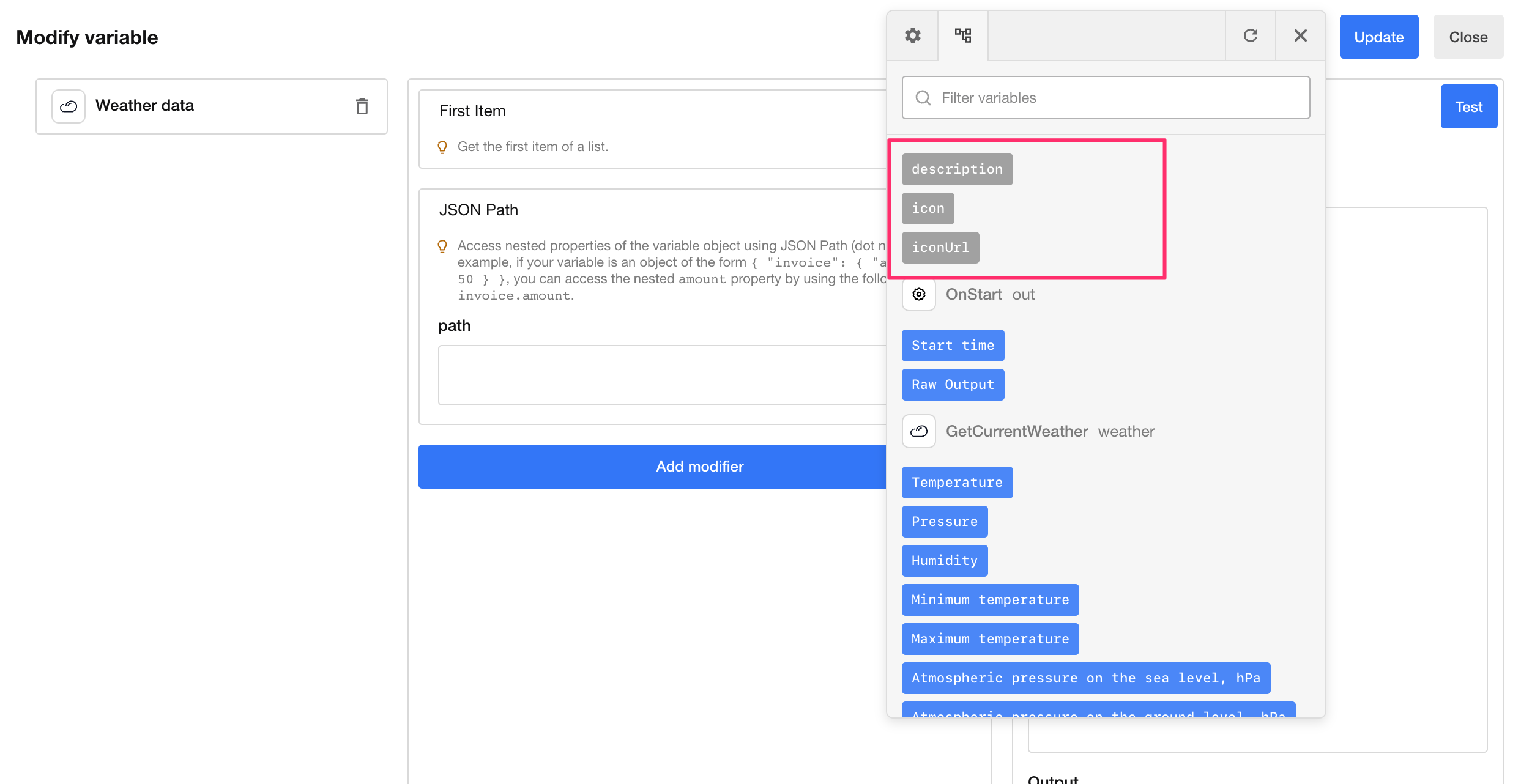
If the `option` is defined as an `array` and you want to work with that array using modifiers:
You will see the `item properties` among other variables.
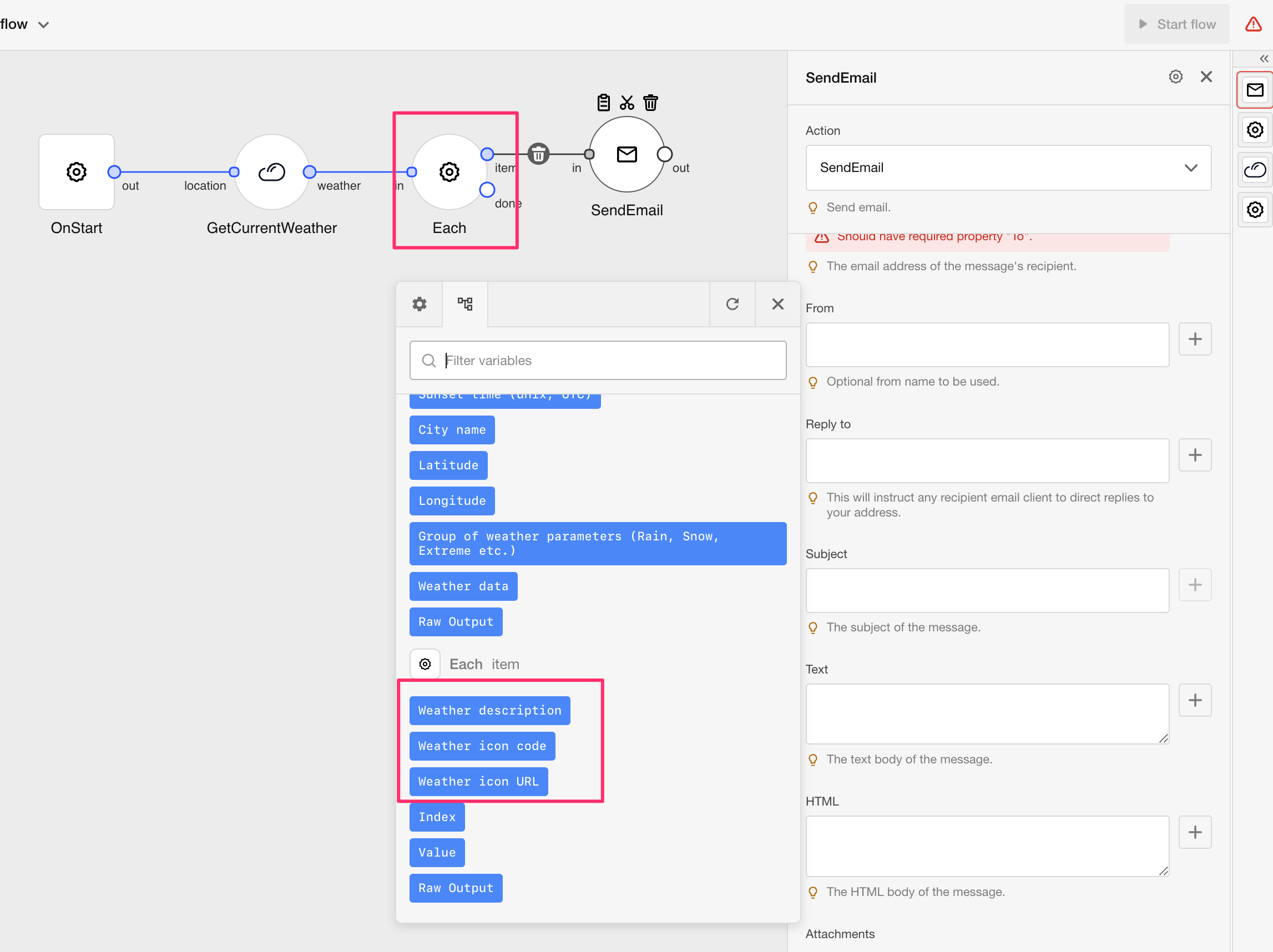
And if you use the *Each* connector, you will see the `item properties` in the Variables picker.
Alternatively, you can define a schema at the top level instead of using the options property. For example:
```json
{
"outPorts": [
{
"name": "weather",
"schema": {
"type": "object",
"properties": {
{ "title": "Temperature", "value": "main.temp" },
{ "title": "Pressure", "value": "main.pressure" },
{ "title": "Humidity", "value": "main.humidity" },
{ "title": "Sunrise time (unix, UTC)", "value": "sys.sunrise" },
{ "title": "Sunset time (unix, UTC)", "value": "sys.sunset" },
{ "title": "City name", "value": "name" },
{
"label": "Weather data",
"value": "weather",
"schema": {
"type": "array",
"items": {
"type": "object",
"properties": {
"description": { "type": "string", "title": "Weather description" },
"icon": { "type": "string", "title": "Weather icon code" },
"iconUrl": { "type": "string", "title": "Weather icon URL" }
}
}
}
}
}
}
}
]
}
```
When you define the structure of the data coming out from your component, the users of your component will have an easier time working with it, as they will be able to do things like selecting nested properties directly, selecting properties on iteration modifiers, and getting properties paths in modifiers. You can find more details about this in [this section](broken://pages/tZdqjdMCUxc5u3qhxBJc).
#### Example values
Every variable in the Designer's variables picker can show a **sample value** so that the user building a flow can see what the data behind a variable actually looks like before the flow has ever run. You provide those samples with the `example` keyword in the output port schema.
Add `example` next to `type` and `title` on each property:
```json
{
"outPorts": [
{
"name": "out",
"schema": {
"type": "object",
"properties": {
"id": { "type": "string", "title": "Task ID", "example": "86cbb4hct" },
"name": { "type": "string", "title": "Name", "example": "Ship the release notes" },
"url": { "type": "string", "title": "URL", "example": "https://app.clickup.com/t/86cbb4hct" },
"date_created": { "type": "string", "title": "Date Created", "example": "1787901544394" },
"time_estimate": { "type": "number", "title": "Time Estimate (ms)", "example": 3600000 },
"archived": { "type": "boolean", "title": "Archived", "example": false }
}
}
}
]
}
```
If your output port uses `options` rather than a top-level `schema`, put `example` inside the per-option `schema` object instead:
```json
{
"outPorts": [
{
"name": "out",
"options": [
{ "label": "Email Message ID", "value": "id", "schema": { "type": "string", "example": "18d4b5c3e7f2a1b0" } },
{ "label": "Snippet", "value": "snippet", "schema": { "type": "string", "example": "Your order #12345 has been shipped..." } },
{ "label": "SizeEstimate", "value": "sizeEstimate", "schema": { "type": "integer", "example": 3200 } }
]
}
]
}
```
**Nested objects and arrays.** Give the object or array property itself a structured `example` that mirrors its `properties` / `items`:
```json
{
"assignees": {
"type": "array",
"title": "Assignees",
"example": [
{ "id": 62612899, "username": "Jane Doe", "email": "jane.doe@example.com" }
],
"items": {
"type": "object",
"properties": {
"id": { "type": "number", "title": "ID" },
"username": { "type": "string", "title": "Username" },
"email": { "type": "string", "title": "Email" }
}
}
}
}
```
A nested variable takes its sample from the example of its parent, keyed by the property name. One structured example on the parent therefore covers the parent variable and all of its children at once, while an `example` placed only on a deeply nested leaf is not displayed.
**A sample for the whole message.** You can also define a single `example` object on the output port `schema` itself. Its keys are used for any top-level property that does not carry its own `example`, which is convenient when you want to paste one real API response into the manifest:
```json
{
"outPorts": [
{
"name": "out",
"schema": {
"type": "object",
"example": {
"id": "86cbb4hct",
"name": "Ship the release notes"
},
"properties": {
"id": { "type": "string", "title": "Task ID" },
"name": { "type": "string", "title": "Name" }
}
}
}
]
}
```
**Which sample wins.** Appmixer resolves the value shown in the picker in this order, first match wins:
1. Real data recorded from previous runs of the flow, when it is available.
2. `default`
3. `example`
4. The first non-empty entry of the JSON Schema `examples` array.
`example` is the keyword to use in a manifest. The `examples` array is only understood so that schemas imported from OpenAPI specifications keep working, and `default` should be reserved for its actual meaning — a default value — rather than added just to drive the preview.
**Guidelines**
* Copy realistic values from a real API response: a real ID format, a real timestamp, a real URL. Placeholders such as `"string"` or `"value"` are worse than no example at all.
* Match the declared `type`. A `boolean` example is `false`, not `"false"`; an `integer` example is `0`, not `"0"`.
* Falsy samples (`0`, `false`, `""`) are rendered, so do not omit them out of concern that they will not show.
* Use `title` for the label the user sees in the picker. `description` is not rendered there — help text belongs on the [inPorts](/building-connectors/manifest/inports.md) inspector instead.
* Never paste real customer data, tokens or personal e-mail addresses into an example. Use obviously fictional values and `example.com` addresses.
{% hint style="info" %}
Example values are also part of the fallback chain that produces sample output when a flow is executed in test mode. See [Providing test data with test(context)](/building-connectors/behaviour.md#providing-test-data-with-test-context).
{% endhint %}
## outPort.source
The definition is similar to the source `source` of [properties](https://docs.appmixer.com/building-connectors/manifest/pages/-LATDlWTegDtvBmHEaZx#properties.source). When used for the output port definition, it allows defining the output port schema dynamically.
There is one difference though. When defined in the output port, the `source` definition can reference both component properties and input fields, while the properties `source` definition can only hold references to other properties' values.
An example is a Google Spreadsheet component UpdatedRow. The output port options of this component consist of the column names in the spreadsheet. But that is specific to the selected Spreadsheet/Worksheet combination. Therefore it has to be defined dynamically.

Here is an example of the UpdatedRow output port definition.
```json
{
"outPorts": [
{
"name": "out",
"source": {
// We will call another component to construct the output port
// options, in this case, the GetRows component
"url": "/component/appmixer/google/spreadsheets/GetRows?outPort=out",
// Every Appmixer component can have 'properties' and input ports,
// the 'data' sections is used to create the input data object
// for the component
"data": {
// in this particular case, the GetRows component has an
// optional property called 'generateOutputPortOptions', we
// will pass that property with the value 'true'. The GetRows
// component will use this property to change its return value
// and instead of returning rows from Worksheet, it will
// return the 'options' array.
"properties": {
"generateOutputPortOptions": true
},
// the GetRows component expects the Spreadsheet ID and
// Worksheet ID as part of the message at its input port
// called 'in'. The UpdatedRow component is a trigger, it
// does not have an input port, but it has the same options like
// 'allAtOnce', 'withHeaders', ... and since it does not have
// an input port, it has these options defined in the
// 'properties' section. The next 'messages' section is used
// to construct an input port object for the GetRows component.
// It copies the user defined properties from the UpdatedRow.
// Appmixer will replace these with the actual values before
// calling the GetRows component.
"messages": {
"in/sheetId": "properties/sheetId",
"in/worksheetId": "properties/worksheetId",
"in/allAtOnce": "properties/allAtOnce",
"in/withHeaders": "properties/withHeaders",
"in/rowFormat": "properties/rowFormat"
}
}
}
}
]
}
```
## outPort.maxConnections
Set the maximum number of outgoing links that can exist from the output port. The maximum number of connections is infinite by default but in some applications, it might be desirable to set a limit on this, usually `1`. The Appmixer Designer UI will not allow the user to connect more than `maxConnections` links from the output port.
---
# Agent Instructions
This documentation is published with GitBook. GitBook is the documentation platform designed so that both humans and AI agents can read, navigate, and reason over technical content effectively. Learn more at gitbook.com.
## Querying This Documentation
If you need additional information that is not directly available in this page, you can query the documentation by asking a question.
Perform an HTTP GET request on the following URL with the `ask` and `goal` query parameters:
```
GET https://docs.appmixer.com/building-connectors/manifest/outports.md?ask=&goal=
```
`ask` is the immediate question: it should be specific, self-contained, and written in natural language.
`goal` is what the user is ultimately trying to achieve, the reason they need the answer. Sharing it helps GitBook give you a better, more relevant answer. A goal is most helpful when it describes the outcome the user wants rather than restating the question. For example, with `ask=how do I create an API token`, a goal like `automate deployments from our CI pipeline` lets GitBook tailor the answer to that use case.
The response will contain a direct answer to the question and relevant excerpts and sources from the documentation.
Use this mechanism when the answer is not explicitly present in the current page, you need clarification or additional context, or you want to retrieve related documentation sections.