> For the complete documentation index, see [llms.txt](https://docs.appmixer.com/llms.txt). Markdown versions of documentation pages are available by appending `.md` to page URLs; this page is available as [Markdown](https://docs.appmixer.com/appmixer-backoffice/audit-logs.md).
# Audit Logs
### Overview
Audit Logs provide a comprehensive record of all activities and changes within your Appmixer tenant. This feature enables administrators to track user actions, monitor system changes, and maintain security compliance by reviewing who did what and when.
### Accessing Audit Logs
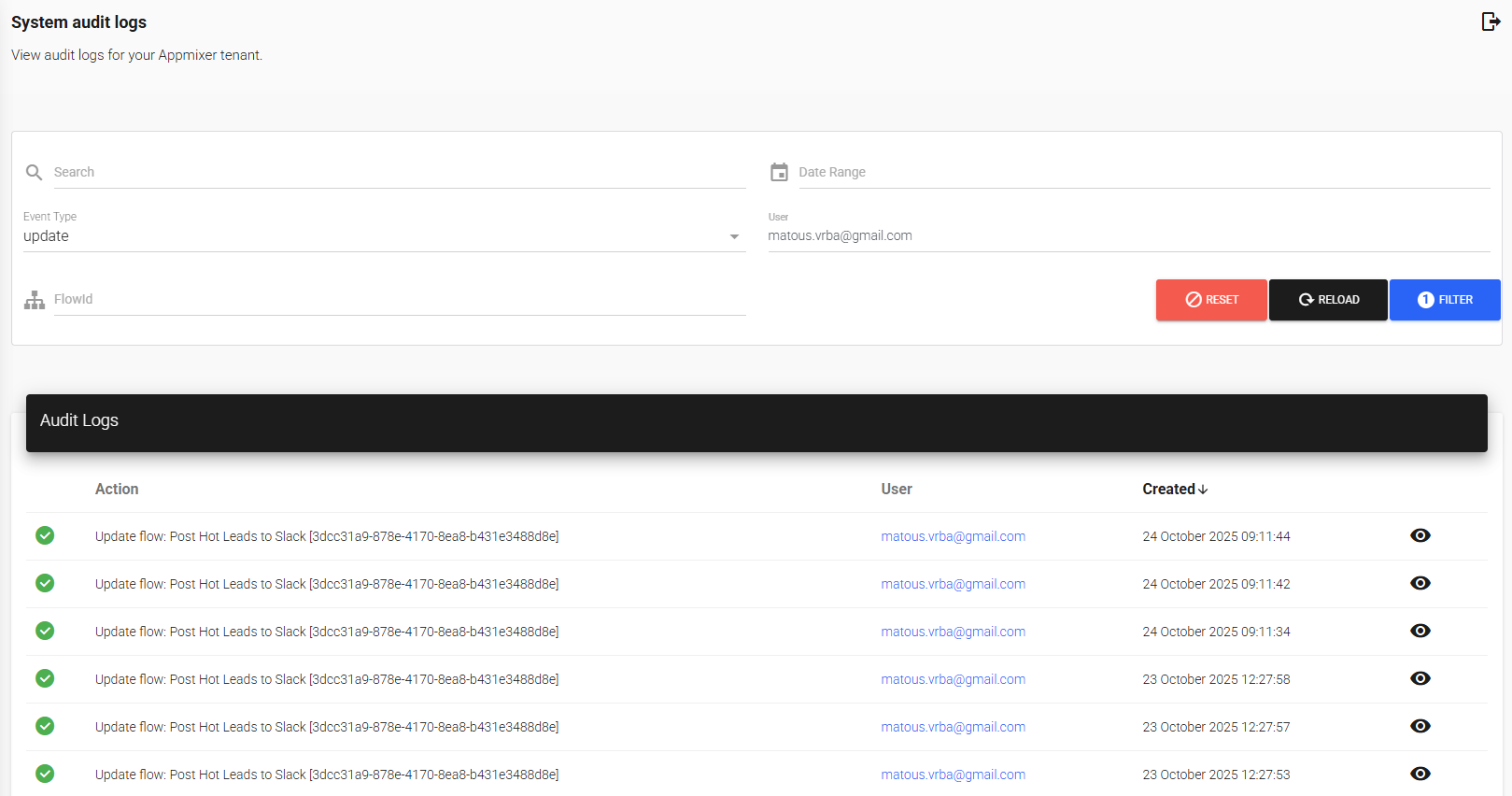
Navigate to **System** > **Audit Logs** to view the audit log interface for your tenant.
To read the audit log from your own code, use the [Audit Logs API](/api/audit-logs.md).
### Using the Audit Logs Interface
#### Filtering Audit Logs
The Audit Logs page provides multiple filtering options to help you find specific events:
**Search**
Use the search bar to find audit log entries by keyword. This searches across action descriptions and related identifiers.
**Date Range**
Filter logs by selecting a specific date range. Click the **Date Range** selector to choose:
* A custom date range
**Event Type**
Filter logs by the type of action performed. Select from:
* **Create** - Events related to creating new resources
* **Update** - Events related to modifying existing resources
* **Delete** - Events related to removing resources
**User**
Filter logs by specific user to see all actions performed by that user.
**Flow ID**
Filter logs to show only events related to a specific flow by entering the Flow ID.
**External User ID**
Filter logs to show only the changes attributed to one person in your own application. Enter the ID your application sent with the change, see [Attribute Changes to Your Own Users](/api/audit-logs.md#attribute-changes-to-your-own-users). The ID must match exactly.
#### Applying Filters
1. Set your desired filter criteria using any combination of the options above
2. Click the **FILTER** button to apply your filters
3. Use **RESET** to clear all filters and return to the full log view
4. Click **RELOAD** to refresh the audit log data
5. Click **DOWNLOAD CSV** to export all entries that match the filters, not only the current page
#### Viewing Audit Log Details
The audit log table displays:
* **Action** - Description of the event that occurred
* **User** - The user who performed the action (displayed as email address). If the change carries an external user ID, it is shown below the user
* **Created** - Timestamp when the event occurred
* **Details icon** (eye icon) - Click to view additional details about the specific event including a diff table. For changes that carry them, the details also show the **External User ID**, the **Source** (`copilot` for changes made by the [AI Copilot](https://github.com/Appmixer-ai/appmixer-docs-gitbook/tree/6.5/getting-started/ai-copilot.md)) and the Copilot **Thread ID**
### Logged Events
Appmixer tracks the following events across different areas of the system:
#### System Configuration
* Configuration Updated
* Configuration Deleted
#### Access Control
* ACL Rule Created/Updated
* Component Access Assigned
#### Flow Management
* Flow Created
* Flow Updated
* Flow Started/Stopped
* Flow Deleted
* Flow Cloned
#### Integration Template Management
* Integration Template Created
* Integration Template Updated
* Integration Template Published
* Published Integration Template Updated
* Integration Template Deleted
#### Integration Template Testing
* Integration Template Test Started
* Integration Template Test Stopped
* Integration Template Test Deleted
#### Connector Management
* Connector Installed
* Connector Updated
* Connector Uninstalled
#### User Management
* User Created
* User Updated
* User Deleted
* User Logged In
* Login Failed
* Password Changed
### Use Cases
#### Security Compliance
Review audit logs to maintain compliance with security standards and policies. Track who accessed what resources and when changes were made.
#### Troubleshooting
Identify when changes were made that may have caused issues. Track the sequence of events leading up to a problem.
#### User Activity Monitoring
Monitor user actions to ensure proper usage of the platform and identify any unusual activity patterns.
#### Change Tracking
Maintain a historical record of all modifications to flows, templates, and system configurations for audit purposes.
---
# Agent Instructions
This documentation is published with GitBook. GitBook is the documentation platform designed so that both humans and AI agents can read, navigate, and reason over technical content effectively. Learn more at gitbook.com.
## Querying This Documentation
If you need additional information that is not directly available in this page, you can query the documentation by asking a question.
Perform an HTTP GET request on the following URL with the `ask` and `goal` query parameters:
```
GET https://docs.appmixer.com/appmixer-backoffice/audit-logs.md?ask=&goal=
```
`ask` is the immediate question: it should be specific, self-contained, and written in natural language.
`goal` is what the user is ultimately trying to achieve, the reason they need the answer. Sharing it helps GitBook give you a better, more relevant answer. A goal is most helpful when it describes the outcome the user wants rather than restating the question. For example, with `ask=how do I create an API token`, a goal like `automate deployments from our CI pipeline` lets GitBook tailor the answer to that use case.
The response will contain a direct answer to the question and relevant excerpts and sources from the documentation.
Use this mechanism when the answer is not explicitly present in the current page, you need clarification or additional context, or you want to retrieve related documentation sections.