> For the complete documentation index, see [llms.txt](https://docs.appmixer.com/llms.txt). Markdown versions of documentation pages are available by appending `.md` to page URLs; this page is available as [Markdown](https://docs.appmixer.com/getting-started/system-webhooks.md).
# Handle Flow Errors
## Per-Component Error Handling
Error handling can be configured per component, directly in the flow. Open the component's context menu in the Designer (cogwheel → **Error handling**) or set the `errorHandling` object on the component descriptor via the API (see [Component Error Handling](/api/flows.md#component-error-handling)):
* **Automatic retry** — whether the engine retries the failed message, with an optional override of the number of retries.
* **On error** — what happens once retries are exhausted:
* **Error port** — the component gets a virtual `error` output port that you can wire to any downstream component (for example, a Slack notification or your own error-handling branch). The connected component receives the error details (`error.message`, `error.code`, `error.name`, `input`) together with the flow data of preceding components, available in the variable picker like any other output port.
* **Stop flow** — the whole flow is stopped.
* **Stop execution** (default) — the failed data message is stored in [Unprocessed Messages](/api/unprocessed-messages.md). Other data messages processed succesfully within the flow are stored in the Logs as usual.
When the `WEBHOOK_FLOW_COMPONENT_ERROR` system webhook (described below) is configured and the error was routed to the error port, the webhook payload is labelled with `sentToErrorPort: true`.
## Error Notification Webhooks
When errors arise in running automations or integrations, Appmixer does not automatically send emails to your end-users. Instead, it offers complete customization of communication with your end-users, enabling you to send your own branded emails or other types of notifications. This approach allows you to maintain consistency in your communication strategy and ensure that all messages align with your brand identity.
{% hint style="info" %}
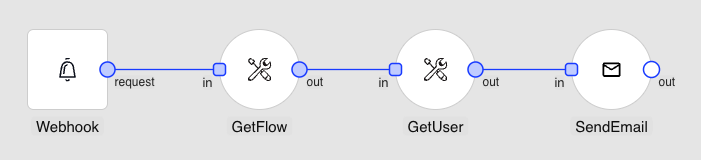
It's worth noting that you can set up your own Appmixer automation to manage error notifications. Simply utilize the Webhook trigger as the starting point for your automation and register the Webhook URL with the `WEBHOOK_FLOW_COMPONENT_ERROR` System Webhook configuration in the Backoffice. This method allows you to automate the notification process effectively, tailoring it to meet your specific needs and and avoid implementing a new endpoint in your own backend application.
{% endhint %}
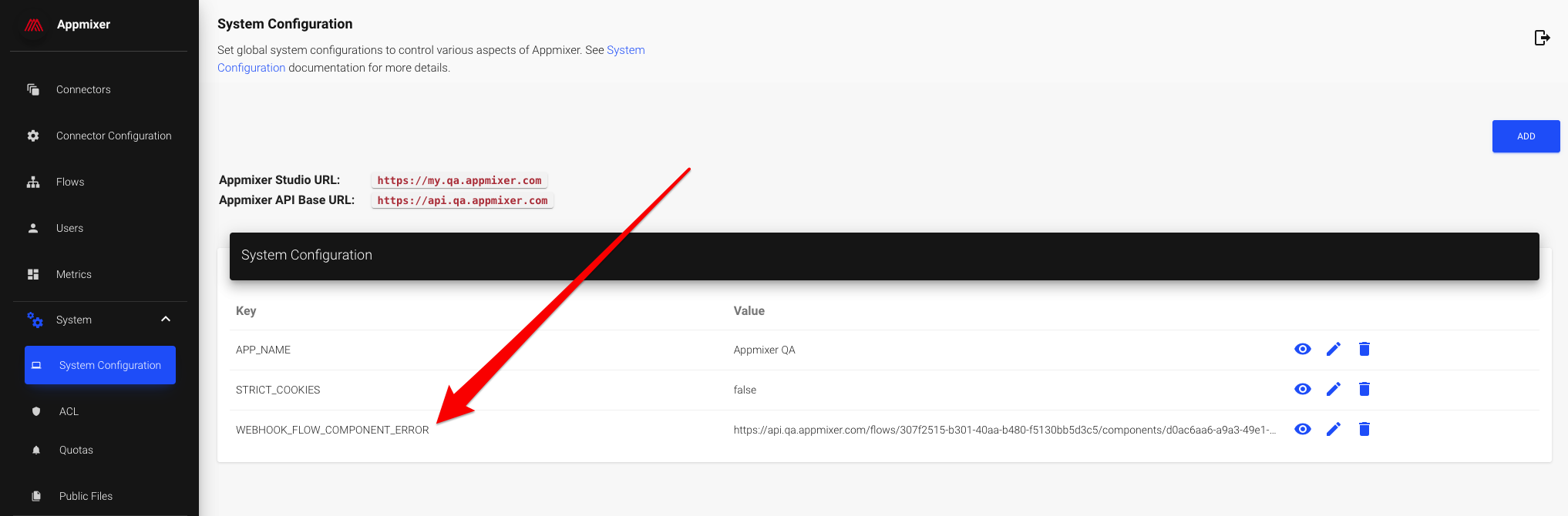
To manage errors within running integrations or automations, configure the `WEBHOOK_FLOW_COMPONENT_ERROR` system variable with a custom URL in the [Appmixer Backoffice](/appmixer-backoffice/getting-started.md) interface. Appmixer will then send an HTTP POST request to this URL each time an error occurs in a flow, enabling you to respond or notify as necessary based on the error details provided. This setup provides a streamlined way to monitor and address issues in real-time.
The payload that Appmixer sends to the registered URL when an error occurs in a flow has the following structure:
```json
{
"err": {
"message": "Validation error on ports: in",
"code": "GRID_ERR_VAL_PORTS",
"name": "ValidationFlowError",
"stack": "ValidationFlowError: Validation error on ports: in\n at MessagesProcessor.process (/Users/martinkrcmar/Programming/client/appmixer/appmixer-core/engine/src/context/MessagesProcessor.js:67:19)\n at Context.prepare (/Users/martinkrcmar/Programming/client/appmixer/appmixer-core/engine/src/context/Context.js:68:31)\n at ContextHandler.createContext (/Users/martinkrcmar/Programming/client/appmixer/appmixer-core/engine/src/context/ContextHandler.js:60:17)\n at async InputQueue.consume (/Users/martinkrcmar/Programming/client/appmixer/appmixer-core/engine/src/InputQueue.js:151:23)\n at async InputQueue.onMessage (/Users/martinkrcmar/Programming/client/appmixer/appmixer-core/engine/src/AMQPClient.js:378:20)"
},
"type": "component",
"flowId": "32f605b2-8fbe-4f68-9db9-ce182b35c159",
"flowName": "New flow",
"userId": "5f804b96ea48ec47a8c444a7",
"componentId": "0bb33e42-fbc4-464e-98f1-459f1ff626ac",
"componentType": "appmixer.utils.email.SendEmail",
"inputMessages": {
"in": [
{
"properties": {
"correlationId": "339bc448-a806-4e61-8d38-4211fcedaf12",
"contentType": "application/json",
"contentEncoding": "utf8",
"sender": {
"componentId": "e8c581b4-9985-4f2c-bf30-895bf1d5541b",
"type": "appmixer.utils.controls.OnStart",
"outputPort": "out"
},
"destination": {
"componentId": "0bb33e42-fbc4-464e-98f1-459f1ff626ac",
"inputPort": "in"
},
"flowId": "32f605b2-8fbe-4f68-9db9-ce182b35c159",
"messageId": "47293e2c-4e33-4558-8805-386de392ef04",
"flowRunId": 1607683798995
},
"content": {
"to": "2020-12-11T10:49:59.050Z"
},
"scope": {
"e8c581b4-9985-4f2c-bf30-895bf1d5541b": {
"out": {
"started": "2020-12-11T10:49:59.050Z"
}
}
},
"originalContent": {
"started": "2020-12-11T10:49:59.050Z"
}
}
]
}
}
```
## Recommendation for End-User Error Notification Content
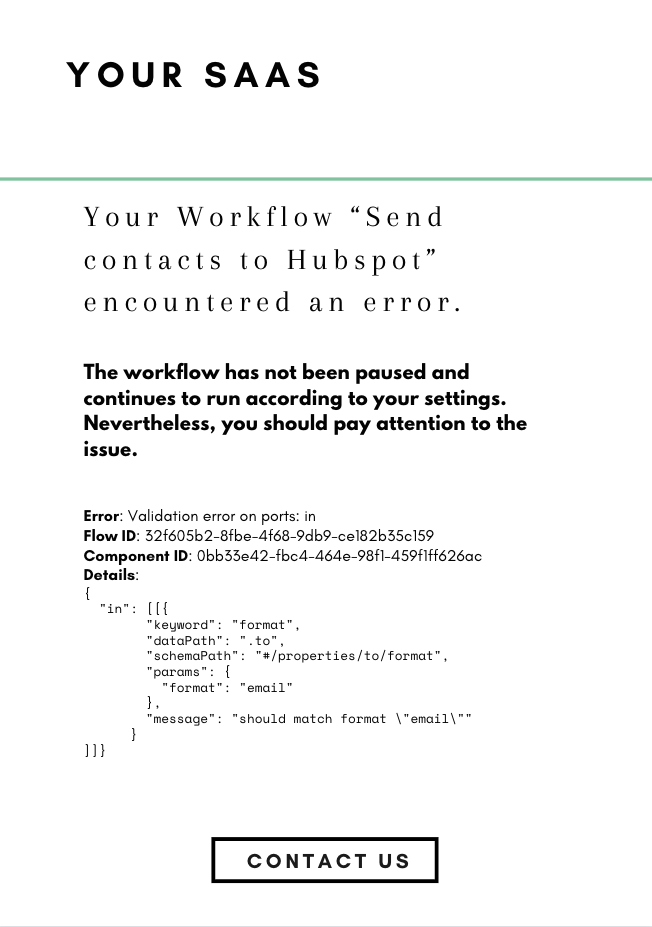
While the error message from Appmixer provides comprehensive details about the issue, it's important to communicate this information to your end-users in a more digestible format. To ensure your notifications are user-friendly and avoid overwhelming your end-users with technical jargon, we recommend structuring your communications as follows:
An example email notification to your end-users.
## Example: Data Validation Error
Given a scenario where the `SendEmail` component in a flow mistakenly references the Start time output of the `OnStart` trigger instead of an email address in the To field, a runtime error will occur. This mistake results in the flow attempting to use a timestamp as the recipient's email address, which is invalid. Consequently, this misconfiguration triggers a runtime error, which is then accurately recorded and can be reviewed in the log viewer.


When an unrecoverable error occurs, such as the one described with the SendEmail component misconfiguration, Appmixer will package the error details into a JSON object. This JSON payload is then sent via an HTTP POST request to the URL specified in the `WEBHOOK_FLOW_COMPONENT_ERROR` system variable. The structure of this payload is designed to provide comprehensive information about the error, including the component that caused it, the nature of the error, and any relevant data to identify and address the issue:
```json
{
"err": {
"message": "Validation error on ports: in",
"error": {
"in": [
[
{
"keyword": "format",
"dataPath": ".to",
"schemaPath": "#/properties/to/format",
"params": {
"format": "email"
},
"message": "should match format \"email\""
}
]
]
},
"code": "GRID_ERR_VAL_PORTS",
"name": "ValidationFlowError",
"stack": "ValidationFlowError: Validation error on ports: in\n at MessagesProcessor.process (/Users/martinkrcmar/Programming/client/appmixer/appmixer-core/engine/src/context/MessagesProcessor.js:67:19)\n at Context.prepare (/Users/martinkrcmar/Programming/client/appmixer/appmixer-core/engine/src/context/Context.js:68:31)\n at ContextHandler.createContext (/Users/martinkrcmar/Programming/client/appmixer/appmixer-core/engine/src/context/ContextHandler.js:60:17)\n at async InputQueue.consume (/Users/martinkrcmar/Programming/client/appmixer/appmixer-core/engine/src/InputQueue.js:151:23)\n at async InputQueue.onMessage (/Users/martinkrcmar/Programming/client/appmixer/appmixer-core/engine/src/AMQPClient.js:378:20)"
},
"type": "component",
"flowId": "32f605b2-8fbe-4f68-9db9-ce182b35c159",
"flowName": "New flow",
"userId": "5f804b96ea48ec47a8c444a7",
"componentId": "0bb33e42-fbc4-464e-98f1-459f1ff626ac",
"componentType": "appmixer.utils.email.SendEmail",
"inputMessages": {
"in": [
{
"properties": {
"correlationId": "339bc448-a806-4e61-8d38-4211fcedaf12",
"contentType": "application/json",
"contentEncoding": "utf8",
"sender": {
"componentId": "e8c581b4-9985-4f2c-bf30-895bf1d5541b",
"type": "appmixer.utils.controls.OnStart",
"outputPort": "out"
},
"destination": {
"componentId": "0bb33e42-fbc4-464e-98f1-459f1ff626ac",
"inputPort": "in"
},
"flowId": "32f605b2-8fbe-4f68-9db9-ce182b35c159",
"messageId": "47293e2c-4e33-4558-8805-386de392ef04",
"flowRunId": 1607683798995
},
"content": {
"to": "2020-12-11T10:49:59.050Z"
},
"scope": {
"e8c581b4-9985-4f2c-bf30-895bf1d5541b": {
"out": {
"started": "2020-12-11T10:49:59.050Z"
}
}
},
"originalContent": {
"started": "2020-12-11T10:49:59.050Z"
}
}
]
}
}
```
## Example: Network Error
If the flow is configured correctly with a valid email address but encounters a network error preventing Appmixer from sending the email, this situation represents a temporary or external issue rather than a misconfiguration within the flow itself. In such cases, Appmixer will attempt to handle the error based on its retry policies or error-handling mechanisms. If the error persists and is deemed unrecoverable for that instance of execution, Appmixer may report this failure through the `WEBHOOK_FLOW_COMPONENT_ERROR` system variable, if configured. The notification sent to the specified webhook URL will detail the error, indicating it was a network issue affecting the email send action, allowing for appropriate troubleshooting or user notification.

Users can then review this error within the log viewer or under Insights, where all flow activities and errors are documented for analysis.
Appmixer sends out a JSON payload to the registered URL containing detailed information about the error:
```json
{
"err": {
"stack": "Error: getaddrinfo ENOTFOUND mandrillapp.com\n at GetAddrInfoReqWrap.onlookup [as oncomplete] (dns.js:66:26)",
"message": "getaddrinfo ENOTFOUND mandrillapp.com",
"errno": "ENOTFOUND",
"code": "ENOTFOUND",
"syscall": "getaddrinfo",
"hostname": "mandrillapp.com",
"name": "Error"
},
"type": "component",
"flowId": "0ab287ef-7bd6-4cc3-b53b-c916c857cbe7",
"flowName": "Invalid email test",
"userId": "5fd744d5e9ed7d0011ca35f9",
"componentId": "cb3f4ff5-7b6e-4d24-b7a8-2115c8254baa",
"componentType": "appmixer.utils.email.SendEmail",
"inputMessages": {
"in": [
{
"properties": {
"correlationId": "254ad628-f9c1-4483-81ed-33a22ac3ddc6",
"contentType": "application/json",
"contentEncoding": "utf8",
"sender": {
"componentId": "bcbeda1d-9036-45af-a25d-a57cf06e3f90",
"type": "appmixer.utils.controls.OnStart",
"outputPort": "out"
},
"destination": {
"componentId": "cb3f4ff5-7b6e-4d24-b7a8-2115c8254baa",
"inputPort": "in"
},
"flowId": "0ab287ef-7bd6-4cc3-b53b-c916c857cbe7",
"messageId": "33b9fcbf-b326-4eb4-bba6-cf34979f4ba2",
"flowRunId": 1607944841843,
"quotaId": "qs-4882d03d-65e1-44dc-983e-d2a33071779d"
},
"content": {
"to": [
{
"email": "martin@client.io",
"type": "to"
}
],
"from_email": "no-reply@appmixer.com"
},
"scope": {
"bcbeda1d-9036-45af-a25d-a57cf06e3f90": {
"out": {
"started": "2020-12-14T11:20:41.858Z"
}
}
},
"originalContent": {
"started": "2020-12-14T11:20:41.858Z"
}
}
]
}
}
```
It's important to note that Appmixer employs an automatic retry mechanism for handling network errors when sending messages. This involves multiple attempts to resend the message, following an exponential backoff strategy to optimize the timing of retries. Thus, the error notification sent via the `WEBHOOK_FLOW_COMPONENT_ERROR` system variable, along with the detailed JSON payload to the registered URL, occurs only if all retry attempts fail. This approach ensures that temporary issues have ample opportunity to be resolved before escalating the error, aiming to maintain the reliability of your automations and integrations without immediate interruption from transient network issues.
## Storage Quota Notifications
When [Database Limits](/appmixer-self-managed/configuration/database-limits.md) are enabled, Appmixer can notify you when users approach or exceed their storage quotas. These notifications are sent via system webhooks, allowing you to proactively manage capacity and communicate with users about their storage usage.
### Storage Quota Webhook Events
Configure the following system webhook variables in the Appmixer Backoffice to receive storage quota notifications:
#### WEBHOOK\_STORAGE\_QUOTA\_WARNING
Triggered when a user reaches the warning threshold (default: 90% of soft limit).
**Payload example:**
```json
{
"event": "storage_quota_warning",
"userId": "5f804b96ea48ec47a8c444a7",
"username": "user@example.com",
"totalBytes": 94371840,
"softLimitBytes": 104857600,
"hardLimitBytes": 524288000,
"warningThreshold": 0.9,
"utilizationPercent": 90.1,
"timestamp": "2026-04-23T10:00:00Z"
}
```
#### WEBHOOK\_STORAGE\_QUOTA\_SOFT\_EXCEEDED
Triggered when a user exceeds their soft limit but remains below the hard limit.
**Payload example:**
```json
{
"event": "storage_quota_soft_exceeded",
"userId": "5f804b96ea48ec47a8c444a7",
"username": "user@example.com",
"totalBytes": 110000000,
"softLimitBytes": 104857600,
"hardLimitBytes": 524288000,
"utilizationPercent": 104.9,
"timestamp": "2026-04-23T11:00:00Z"
}
```
#### WEBHOOK\_STORAGE\_QUOTA\_HARD\_EXCEEDED
Triggered when a user exceeds their hard limit. At this point, write operations are blocked, jobs are paused, and incoming webhooks are rejected.
**Payload example:**
```json
{
"event": "storage_quota_hard_exceeded",
"userId": "5f804b96ea48ec47a8c444a7",
"username": "user@example.com",
"totalBytes": 530000000,
"softLimitBytes": 104857600,
"hardLimitBytes": 524288000,
"utilizationPercent": 101.1,
"blocked": true,
"timestamp": "2026-04-23T12:00:00Z"
}
```
### System Capacity Webhook Events
System-wide capacity events notify administrators when the entire system approaches or reaches capacity limits.
#### WEBHOOK\_SYSTEM\_CAPACITY\_WARNING
Triggered when system storage utilization reaches the warning threshold (default: 80%).
**Payload example:**
```json
{
"event": "system_capacity_warning",
"physicalCapacityBytes": 107374182400,
"dataBytes": 85899345920,
"utilizationPercent": 80.0,
"maxUtilizationPercent": 95.0,
"state": "yellow",
"timestamp": "2026-04-23T10:00:00Z"
}
```
#### WEBHOOK\_SYSTEM\_CAPACITY\_CRITICAL
Triggered when system storage utilization reaches the critical threshold (default: 95%). At this point, the circuit breaker activates and blocks write operations system-wide.
**Payload example:**
```json
{
"event": "system_capacity_critical",
"physicalCapacityBytes": 107374182400,
"dataBytes": 102005473075,
"utilizationPercent": 95.0,
"maxUtilizationPercent": 95.0,
"state": "red",
"blockedSubsystems": [
"inputQueue",
"dispatcher",
"webhooks",
"fileUpload",
"flowCreate",
"flowStart",
"userSignup",
"dataStore",
"polling",
"delayedMessages",
"componentTimeouts"
],
"timestamp": "2026-04-23T13:00:00Z"
}
```
### Notification Cooldown
Storage quota notifications respect a cooldown period (default: 24 hours) to prevent notification spam. Once a notification is sent for a specific user and event type, the same notification will not be sent again until the cooldown period expires, even if the user remains in the same quota state.
### Use Cases
**Storage quota webhooks enable you to:**
* Send branded emails to users about their storage usage
* Trigger automated cleanup processes
* Alert administrators about users approaching limits
* Create dashboards showing storage utilization trends
* Implement tiered storage plans with automatic upgrades
* Proactively manage system capacity before reaching critical levels
For more information about configuring and managing database limits, see [Database Limits](/appmixer-self-managed/configuration/database-limits.md).
---
# Agent Instructions
This documentation is published with GitBook. GitBook is the documentation platform designed so that both humans and AI agents can read, navigate, and reason over technical content effectively. Learn more at gitbook.com.
## Querying This Documentation
If you need additional information that is not directly available in this page, you can query the documentation by asking a question.
Perform an HTTP GET request on the following URL with the `ask` and `goal` query parameters:
```
GET https://docs.appmixer.com/getting-started/system-webhooks.md?ask=&goal=
```
`ask` is the immediate question: it should be specific, self-contained, and written in natural language.
`goal` is what the user is ultimately trying to achieve, the reason they need the answer. Sharing it helps GitBook give you a better, more relevant answer. A goal is most helpful when it describes the outcome the user wants rather than restating the question. For example, with `ask=how do I create an API token`, a goal like `automate deployments from our CI pipeline` lets GitBook tailor the answer to that use case.
The response will contain a direct answer to the question and relevant excerpts and sources from the documentation.
Use this mechanism when the answer is not explicitly present in the current page, you need clarification or additional context, or you want to retrieve related documentation sections.